#3175: Website Task Flowchart
Permalink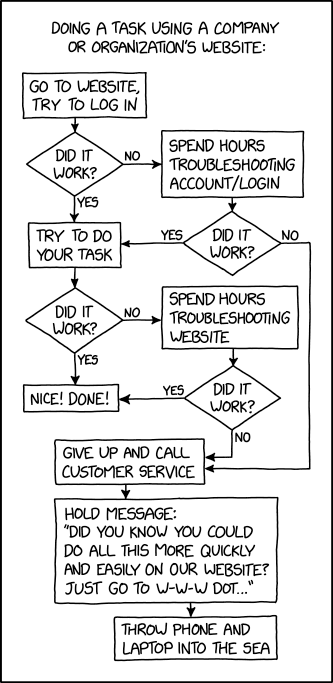
Transcript
[Caption above the panel:] Doing a task using a company or organization's website:
[Below this is a flowchart, starting with "Go to website, try to log in"]
[Box 1 (start):] Go to website, try to log in (go to to box 2)
[Box 2:] Did it work? (Yes/No)
- Yes: Go to box 3
- No: Go to box 6
[Box 3:] Try to do your task (go to box 4)
[Box 4:] Did it work? (Yes/No)
- Yes: Go to box 5
- No: Go to box 8
[Box 5 (end):] Nice! Done!
[Box 6:] Spend hours troubleshooting account/login (go to box 7)
[Box 7:] Did it work? (Yes/No)
- Yes: Go to box 3
- No: Go to box 10
[Box 8:] Spend hours troubleshooting website (go to box 9)
[Box 9:] Did it work? (Yes/No)
- Yes: Go to box 5
- No: Go to box 10
[Box 10:] Give up and call customer service (go to box 11)
[Box 11:] Hold message: "Did you know you could do all of this more quickly and easily on our website? Just go to W-W-W dot..." (go to box 12)
[Box 12 (end):] Throw phone and laptop into the sea
(Sourced from explainxkcd.com)
Title text:Tired of waiting on hold? Use our website to chat with one of our live agents, who are available to produce words at you 24/7!